
Code Signing Certificates are not enough
11 August 2021
I was pretty excited to launch ValueTools and as the most experienced ones would say, get early feedback and make the app better.
To do that, it was required to release the app to public. So I released the app hoping to get some early traction. But soon after the release, my gut kicked in and I decided to setup a virtual machine. Downloaded and clicked the installer and something happened.
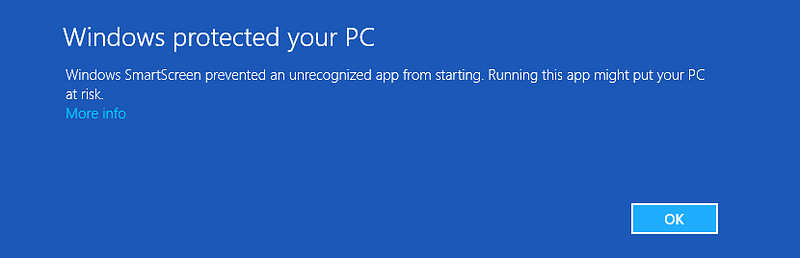
That’s when this screen scared the hell out of me. I needed to fix this, as I had already launched and this was definitely something nobody would want to see from a newly launched product.
My early impression was that because the application wasn’t signed, Windows might be giving those warnings. So the next step was to search for a good and reputed Code Signing Certificate.
I wanted to spend within budget for a code signing certificate, so as to keep my investments low. I searched and found a certificate that seemed like a good buy from Comodo-Store. I bought a Sectigo Organization Validated Code Signing Certificate and signed my release installer as well as the executable files with the new certificate.
My understanding now was, anybody downloading the app won’t see these scary Smart Screen Warnings on download. After-all a reputed organization has validated my identity and my business, after checking all my documents and then issued me a certificate.
I was wrong 😢
I decided to again download the signed installer on my virtual machine, hoping “not” to get that blue warning again. It seems it’s not that easy. Even though my certificate was Organization Validated, these OV/IV (read standard) Code Signing certificates simply don’t make any difference to Windows Smart Screen. At least not in the early days. Anybody downloading your signed installer or exe will still get that warning (and might as well delete that exe, never to come back again, bad luck).
I researched and found that Smart Screen needs a reputation of the app as well as the publisher certificate to hide those scary warnings.
And how do you get reputation? 👀
You get reputation as more and more people download and install the app. Overtime Windows Smart Screen will learn that your app (and so you) is safe and doesn’t harm the computer. Nobody, but Microsoft, knows exactly what needs to be done to get reputation quickly.
This doesn’t happen overnight. Some people reported that the reputation didn’t build for their app even after waiting for half a year.
It’s Catch 22 🤦♂️
So to say it short, to get reputation, you need more downloads and installs and to get more installs, you need to prevent that Smart Screen warning, which can only happen once you have some reputation, for which you need more downloads and installs… A typical Catch 22 situation.
One more thing
Don’t get too excited once your certificate has developed a reputation over time, there will be a time when the certificate expires 😢 and you will need to renew the certificate (or buy certificate from another provider).
Bad News! Your reputation doesn’t carry forward to your new certificate. Get yourself prepared start the reputation hunting and building again.
Conclusion
Is there any way to bypass Smart Screen Warning? I wish I knew. But from what I have researched so far, Extended Validation Code Signing Certificates don’t produce those warnings. And “so that not everybody can afford it”, they are very expensive.
I bought the OV certificate for $80.00 for 1 year. The same EV certificate costs $349.00. A straight 4x. If you can afford to buy that, that’s the premium you pay for getting away with those scary warnings.
For the remaining ones like me, let’s just keep fingers crossed 🤞 and hope that users trust you more than those smart warnings, before they automatically disappear.